Printing Turnaround Time: Copyable 1 Week, 2 Week & Same Day Schedules
Copy 1 week, 2 week, and same day print schedules. Use file, proofing, and shipping checklists and request a confirmed turnaround quote.
Printing Turnaround Time: Copyable 1 Week, 2 Week & Same Day Schedules
Expect several business days from proof approval to delivery for most print and apparel orders, with same-day pickup possible on select products. That window depends on three levers: how fast you approve your proof, the printing method (screen, DTG, DTF, or digital litho), and how many units you’re ordering. Miss the cutoff hour or send a file that needs rework, and the whole schedule shifts a day or two later.
TL;DR:
- Proof approval typically triggers a 1 to 2 business day production window, but delays often occur if proofs are not approved promptly or files need rework.
- Printing methods and order size significantly impact turnaround time, with DTF and DTC faster for small runs and screen printing more efficient for larger quantities.
- Order delays are common during busy periods like holidays or back-to-school seasons due to increased queue length, which can extend turnaround by several days.
- File quality and format are the most frequent causes of delay, with low-resolution images, RGB files, or missing bleed margins adding one to two days for rework.
- Confirming exact shop cut-off hours and submitting print-ready artwork early remains the best habit to ensure on-time delivery, especially when planning for tight deadlines.
Table of Contents
- What Does Printing Turnaround Time Actually Cover?
- How Long Does Printing Take by Product and Method?
- What Slows Down or Speeds Up a Print Order?
- How to Build a Printing Schedule That Actually Hits the Deadline
- Which File Types Avoid the Most Common Delays?
- How Torontocustomtshirts Keeps Turnaround Predictable
- The One Habit That Actually Guarantees On-Time Delivery
- Get a Confirmed Turnaround Quote Before You Order
- Where These Timelines Come From
- Sources
What Does Printing Turnaround Time Actually Cover?
Turnaround time is production plus the handoff to a courier or your local pickup counter. It is not the same as shipping time, which starts only once a finished order leaves the shop. Confusing the two is the single most common reason people miss deadlines.
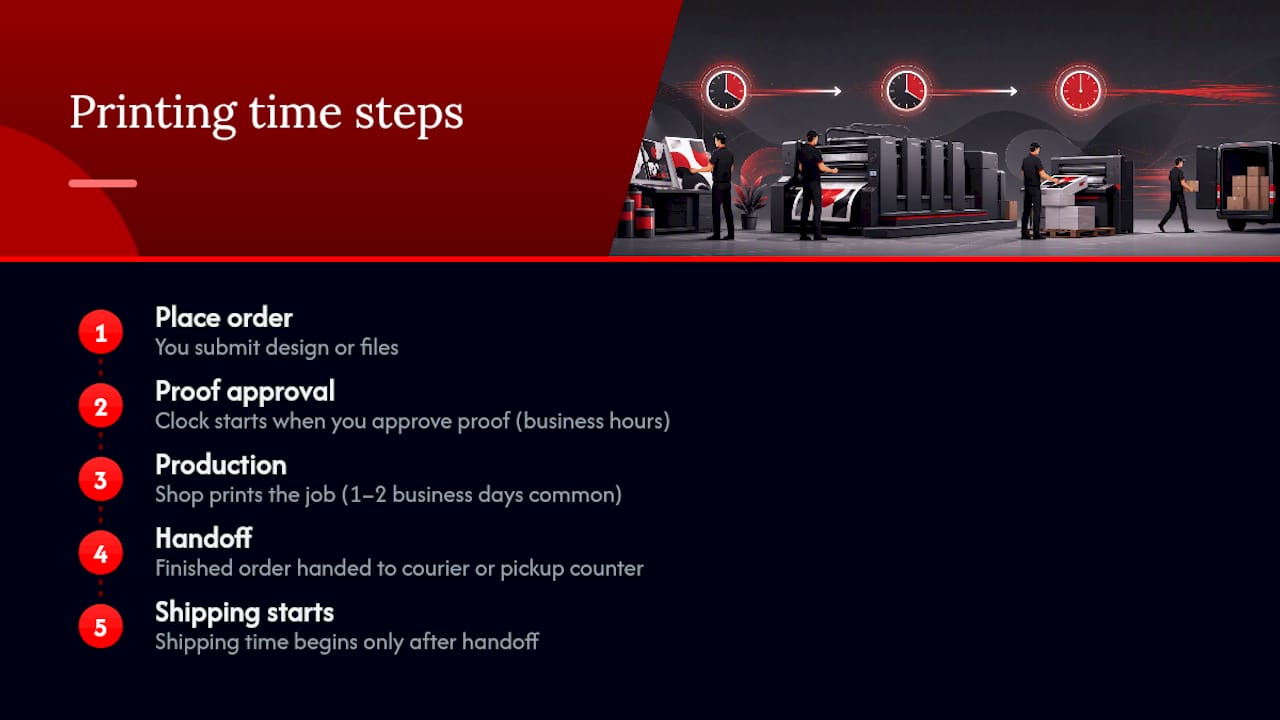
Most printers don’t start the clock when you place the order. They start it when you approve the proof, and proofs are processed during posted business hours, not around the clock. Smartpress explains this plainly: submit a design at 9 PM Tuesday, and if the shop’s proof desk closes at 5 PM, your review email may not even go out until Wednesday morning.
Cutoff-hour rules compound the effect. Order after the daily cutoff and your job typically gets logged as next business day. Canva’s print help center notes production commonly runs 1 to 2 business days, but anything submitted past the local cutoff adds a full extra day before that clock even starts. Weekends, statutory holidays, and time zone gaps between you and the shop stretch things further. None of that is padding. It’s how print queues actually operate.
How Long Does Printing Take by Product and Method?
Ranges vary by product, but the pattern is consistent: paper goods move faster than apparel, and apparel timing depends heavily on which decoration method you pick.
Staples’ shipping and delivery guidance confirms several of these product categories can qualify for same-day, in-store pickup, provided the order is placed by the store’s specific cutoff time. That cutoff is usually late morning to early afternoon, so it pays to check before you assume “same day” applies.
A few things worth flagging before you build a schedule around these numbers:
- DTG and DTF print small apparel runs faster because setup is minimal, matching what Printify’s production breakdown describes as a typical 48 to 72 hour window.
- Screen printing needs hours of screen setup per color before the first shirt comes off the press, which is why it’s slower for a run of 12 shirts but faster per unit once you’re printing hundreds.
- Shipping ranges depend on courier performance and your location, not just the print shop, so treat the shipping column as a variable, not a promise.
What Slows Down or Speeds Up a Print Order?
Three things push a job past its stated range: queue depth, order size, and finishing complexity.
Shops don’t run at a flat pace year round. Back-to-school and the holiday season stack orders in the queue, and a job that would normally clear in three days can slide to five or six simply because forty other orders are ahead of it in line.
Order size changes which method makes sense, and therefore how long production takes. Screen printing’s setup overhead means it’s rarely worth it under roughly a few dozen units; DTF and DTG win on small runs precisely because they skip that setup step. The break-even point for switching to screen printing usually falls somewhere in the several-dozen to low-hundreds range, depending on how many colors the design uses.
Finishing adds discrete, predictable days on top of base production:
- Foiling or specialty coatings may add additional days to production time.
- Binding or folding on multi-page pieces may add an extra day.
- Embroidery on apparel usually requires several additional days depending on stitch count and digitizing needs.
How to Build a Printing Schedule That Actually Hits the Deadline
Work backward from your delivery date, not forward from today. Here’s a template you can adapt to almost any deadline:
- 4 weeks out: Finalize design concept and quantities; request a written quote.
- 3 weeks out: Submit print-ready artwork and confirm who approves the proof.
- 2 weeks out: Approve the proof the same day it arrives; lock the shipping method.
- 1 week out: Confirm production has started; verify the shipping address and any split-shipment needs.
- 3 days out: This window is realistic only for DTG/DTF apparel or simple paper goods with an approved proof already on file.
- Same day: Only viable for in-store pickup items ordered before the shop’s posted cutoff.
At order time, have four things ready: print-ready artwork in the correct format, final quantities, a named proof approver, and your preferred shipping method. If you’re ordering multiple products for one event, know that most shops ship a combined order based on its slowest item, so a banner that needs an extra two days will hold up the shirts that were otherwise ready.
Pro Tip: If part of your order is time-sensitive and part isn’t, ask the shop to split the shipment. Paying for two shipping charges is usually cheaper than delaying your whole event by two days.
Which File Types Avoid the Most Common Delays?
File problems cause more schedule slippage than anything on the production floor. Submit vector files (PDF or AI) for logos and text, and 300 DPI TIFF, PNG, or JPEG files for photos and raster artwork. Set your color mode to CMYK, not RGB, since RGB files print duller and often trigger a proof rejection. Outline or embed your fonts so nothing reflows on the shop’s end.
The usual culprits behind rework are low-resolution images, RGB color files, and missing bleed margins, and fixing them typically adds 1 to 2 business days to the schedule. Our guide on what to look for before ordering custom apparel covers file prep in more depth.
If more than one person needs to sign off on a design, designate a single final approver before the file goes out for proofing. Group approvals by committee are the number one reason a “1 to 2 day” proof turns into a week-long back and forth.
How Torontocustomtshirts Keeps Turnaround Predictable
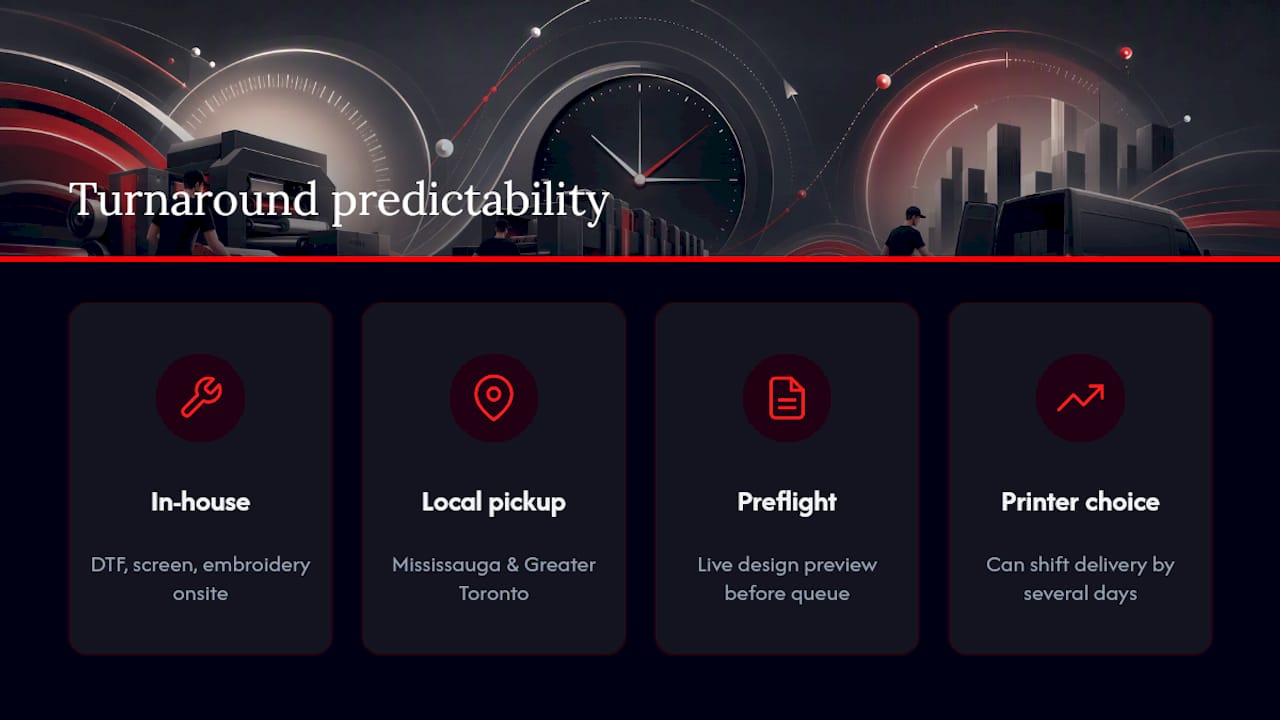
Torontocustomtshirts runs DTF printing, screen printing, and embroidery in house, which means production doesn’t wait on an outside vendor once your proof is approved. Local pickup is available for orders placed in Mississauga and the greater Toronto area, and rush production is available depending on current shop capacity, similar to how most print shops handle rush requests: always confirmed before you pay, never assumed.
Every order gets a live design preview and print-ready artwork support before it enters the production queue, which is where most of the 1 to 2 day delays described above actually happen. Comparing DTF against screen printing for your specific order is worth doing before you commit to a quantity, since that choice alone can shift your delivery date by several days. If you need a firm date rather than a general range, reach out with your quantity and deadline and get a confirmed production window back before you place the order.
The One Habit That Actually Guarantees On-Time Delivery
Every late order I’ve seen traced back to one thing: a proof that sat unopened for two or three days while production hours ticked by unused. Submit print-ready artwork upfront and approve the proof the same day it lands in your inbox. That single habit does more to protect a deadline than any rush fee.
Beyond that, confirm the shop’s actual cutoff hour rather than assuming it matches another provider’s policy, and call ahead if you need rush capacity. Availability shifts week to week, and a shop that could rush your order last month may be booked solid this week.
— Toronto
Get a Confirmed Turnaround Quote Before You Order
Torontocustomtshirts is the alternative to guessing at a delivery date from a generic online range. Tell us your quantity, method, and deadline, and we’ll confirm an actual production date, not a rough estimate pulled from a table.
Here’s what that looks like in practice:
- Single shirts through bulk team orders, with DTF, screen printing, and embroidery all handled in house.
- Local pickup across Mississauga and the GTA, plus shipping for orders outside the area.
- Rush options when shop capacity allows, confirmed before you pay, not promised upfront.
Start on the main ordering page for individual or small orders, or head to the bulk orders page if you’re printing for a team, event, or business and need volume pricing alongside a firm delivery date.
Where These Timelines Come From
Production and shipping ranges above draw from published help-center policies, including Smartpress’s turnaround guidelines, Staples’ shipping and delivery information, Printify’s apparel production breakdown, and Canva’s print delivery FAQ. For local scheduling specifics, see Torontocustomtshirts’s pickup and delivery guide.
Sources
- Printing Turnaround Time
- Shipping and Delivery Information – Help Centre
- How long does it take to print a shirt? (Printify)
- Canva Print delivery times - Canva Help Center
Recommended
Get pricing in 24h.
Toronto-based, no minimums. Tell us about your project and we'll email a detailed quote within one business day.
Request a Quote